Hadria: The PowerPoint Template That Breaks the Mold
Beyond the Boring Boardroom: A Look at Hadria's Unique Design
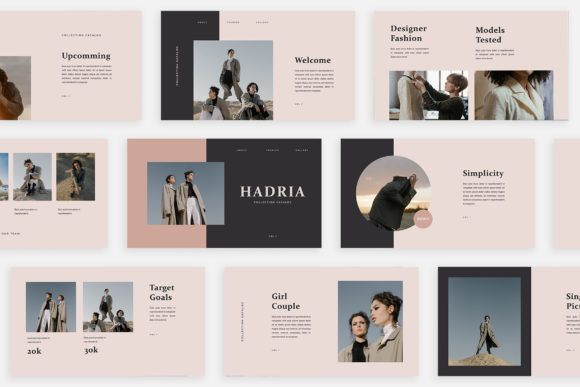
We’ve all sat through it. The presentation that feels like a visual lullaby, where every slide is a slight variation of the last, using the same tired layout and generic stock photo placeholders. The Hadria - Powerpoint Template exists as a direct antidote to that monotony. This isn't just another collection of pre-formatted slides; it's a curated set of 30 distinct visual narratives. Each slide in Hadria is crafted with its own unique layout, composition, and personality, moving far beyond a simple recurring grid. The overall aesthetic leans into a clean, modern, and highly editorial feel, reminiscent of a high-end lookbook or a minimalist magazine spread. It’s designed for clarity and impact, ensuring your content—not the template’s limitations—takes center stage.
Where Hadria Truly Shines: Real-World Applications
The true test of any design asset is its versatility. The Hadria template’s strength lies in its ability to adapt to a wide array of professional and creative contexts without losing its distinctive character. For digital media professionals and marketers, it’s a powerhouse. Imagine pitching a new social media campaign or a brand strategy to a client. With Hadria, you can build a presentation that mirrors the sophistication of the campaign itself, using its lookbook-style layouts to showcase mood boards, competitor analysis, and projected outcomes in a visually compelling way. The unique theme colour feature, which allows for automatic color changes, means you can effortlessly align the entire deck with a client’s brand palette, reinforcing brand identity from the first slide.
For entrepreneurs and small business owners, Hadria serves as a critical tool for professionalism. Whether you’re pitching to investors, onboarding a new business partner, or presenting quarterly results, the template’s high-resolution 1920x1080 pixel slides and many variations of layout and text ensure your message is communicated with polish and authority. It eliminates the guesswork of design, allowing you to focus on your core message. The magazine style layout is particularly effective for product-based businesses or service providers, enabling you to create a presentation that feels less like a report and more like an immersive brand experience.
Practical Integration: Making Hadria Work for You
Adopting a new template into your workflow should be seamless, not a source of frustration. Hadria is built on this principle. The use of Slidemaster technology is a game-changer for efficiency. It means the foundational design elements are locked in a master slide, allowing you to simply drag & drop your images into placeholders without worrying about breaking the layout or alignment. This easy to customize and fully editable structure respects your time. The inclusion of a free font (with a link provided in the Help & Instruction PDF) removes a common barrier, giving you a complete, ready-to-use typographic system that complements the design.
When evaluating if Hadria is the right fit for your project, consider the communication goal. It excels in scenarios where visual storytelling and clear information hierarchy are paramount. For a creative font or design assets presentation, it provides the perfect neutral-yet-stylish canvas to let your work speak for itself. For a brand strategy deck, its clean lines and structured layouts support complex ideas without visual clutter. A key piece of advice: use the picture placeholder system as intended. It’s designed to maintain the visual rhythm of each slide. Replacing the placeholder images with your own high-quality photography or graphics is what will transform the template from a generic tool into a bespoke presentation that feels authentically yours.
Ultimately, the Hadria - Powerpoint Template is more than a collection of slides; it’s a framework for professional communication. It acknowledges that in today’s visual landscape, how you present information is as critical as the information itself. By providing a diverse toolkit of unique, high-quality layouts, it empowers you to build presentations that are engaging, memorable, and distinctly aligned with your project’s goals, whether for a personal project or a high-stakes client’s business.