Babolium - Google Slide Template: A Designer's Toolkit for Impactful Presentations
Finding a presentation template that balances professional polish with genuine creative flexibility can feel like searching for a needle in a digital haystack. Too many are either rigidly corporate or so stylistically overwrought that they distract from your message. The Babolium - Google Slide Template lands in a sweet spot, offering a foundation that is clean, scalable, and colorful without sacrificing a sense of personality. It’s built for the real world, where you need to move quickly, adapt to different clients or projects, and still deliver a presentation that feels considered and intentional.
More Than Just Slides: A Visual Identity System
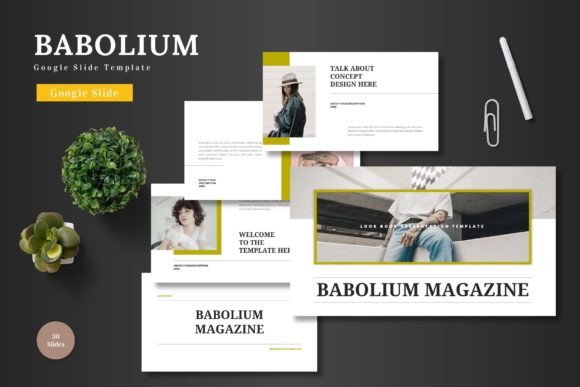
At its core, Babolium presents itself as a multipurpose toolkit. The "clean, scalable, colorful" descriptor isn't just marketing copy; it speaks to a design philosophy centered on clarity and adaptability. The template’s visual character is modern and approachable, leaning into ample white space, bold geometric shapes, and a restrained yet vibrant color palette. This isn't about flashy animations or trendy gradients for their own sake. Instead, the pixel-perfect illustrations and handcrafted infographics are designed to support complex information, making data digestible and concepts visually engaging. The personality is confident and friendly—professional enough for a boardroom pitch but creative enough for a product launch or a conference talk.
This visual consistency is maintained through its structure. With 150+ total slides across 5 premade colors, and 30 dedicated slides per color scheme, you’re not just getting a single deck. You’re getting a cohesive design asset library. The inclusion of section break slides and a master slides system is crucial for efficiency. It means you can restructure the flow of your presentation without manually adjusting every title box or footer. For anyone managing multiple projects—a freelance designer juggling clients, an entrepreneur pitching different ideas, or a marketer creating internal training—this system-based approach saves hours and prevents formatting errors.
Practical Applications: From Boardroom to Workshop
Where does a template like Babolium truly shine? Its versatility is its strongest suit. For business and pitch decks, the structured layouts and clean typography establish immediate credibility. The gallery and portfolio slides are invaluable for creative agencies or product-based businesses showcasing work. An e-commerce brand can use the template to present quarterly results to stakeholders or train new staff on product features, using the picture placeholder feature to seamlessly integrate product shots.
But its utility extends beyond formal presentations. The template's friendly style makes it suitable for personal needs and content creation. A blogger could adapt the slides to create a cohesive visual guide for a workshop. A crafter or hobbyist might use it to document a process for a community group. The key is the editable elements. Because everything is modifiable directly within Google Slides—no need for specialized software like Adobe Illustrator—you can tailor the color scheme to match your brand identity precisely. Replace placeholder images with your own photography, adjust accent colors to your logo’s hex codes, and resize the vector graphics without loss of quality. This level of control is what elevates a generic template into a genuine brand identity tool.
Ensuring Professional Results and Cohesion
A common pitfall with templates is that they can look great in the preview but become unmanageable when you start editing. Babolium mitigates this with its focus on Google Slides as the native environment. This means real-time collaboration is seamless, and the final presentation is inherently web-ready. The readability of the default layouts is thoughtful; text hierarchies are clear, and there’s sufficient contrast between foreground elements and backgrounds. This attention to visual hierarchy ensures your audience follows your narrative without struggling to parse information.
When evaluating any template, consider how its built-in font pairing and typography will hold up. While the specific fonts used in Babolium are noted in the included readme file, the system is designed to be robust. The clean, sans-serif foundations likely used for body text ensure maximum readability on screens of all sizes, while the display fonts for headings add character without sacrificing clarity. This balance is critical for maintaining professionalism and audience engagement. Before committing, always test the template with your own content. Insert a lengthy paragraph of text into a body slide. Swap in a low-resolution version of one of your images. Does the layout still hold? Does the color scheme work with your brand’s existing assets? This hands-on evaluation is the best way to judge if the template’s style and scalability are the right fit for your project’s demands.
Ultimately, the Babolium - Google Slide Template is less about a single aesthetic and more about providing a reliable, high-quality framework. It’s a premium starting point that respects your time and your brand’s need for consistency. By handling the structural and visual groundwork, it frees you to focus on what truly matters: your message, your story, and your connection with the audience. For anyone who regularly creates presentations—from startup founders to seasoned marketers—it’s a tool designed to make you look prepared, polished, and professional with minimal friction.